Low Cost MacBook

We'll see a new MacBook (Pro) tomorrow if all the rumors are right. My current MacBook Pro (MBP) is one of the first releases (the Intel 1.0 version so to say), and is working just fine. I even used it to view HD content on my TV (720p max, but without DTS decoding).

The last year I was having this idea of upgrading my MBP so that I'm able of watching full HD content on my TV. But now with the arrival of the Popcorn Hour that necessity is gone. Now I can 'upgrade' my MBP to a new (sub $1000 ??) MacBook when the time comes. All I do on the laptop is a bit of;

  • browsing
  • e-mail
  • basic photo editting
  • webdev

No need to spend extra for watching HD content. It's like 'spending money to save money'.

Posted on October 13, 2008 and filed under Apple, Hardware, Personal.

Popcorn Hour A-110

Popcorn Hour A-110 Popcorn Hour A-110'Networked Media Tank' a.k.a. 'Popcorn Hour' is another name for an awesome piece of hardware. It's a small device (the size of a 8-port desktop switch)) that enables you to view media on your TV. You name the format, and it plays it. No matter what the resolution is.

The Popcorn Hour (PCH) is a specialized piece of hardware just for decoding media. Even MKV (Matroska Containers) files are supported. I tried this by downloading a sample of Iron Man in 1080p with DTS audio, and it performed flawlessly. The picture quality was superb.

Besides watching video's you can also;

  • listen to music
  • watch your holiday pictures
  • watch (pre-programmed) online media like YouTube
  • use it as a torrent downloader
  • use it as a usenet downloader (NZBGet)

I currently use mine solely with the HDMI connector hooked up to my Pioneer A/V Receiver. This way I get to enjoy all the benefits of HD content. There are numerous ways of connecting the PCH to your TV/Home Theater. Both analog and digital.

One little drawback; don't plan on doing a lot of pushing buttons on the remote when you are copying lot's of files over the network to the device. I had to reset my PCH twice in an hour. The CPU for the operating System (OS) on the device is for the interface and basic network connectivity (there's a CPU for displaying media, and a CPU for the OS). So if you're gonna stress the device it might hang.

So, if you're thinking about a Home Theater PC (HTPC) for the purpose of watching media this is the device for you. If you plan on recording TV you'll need another device for doing that.

Posted on October 13, 2008 and filed under Gadgets, Hardware, Movies.

Original DVD's.....

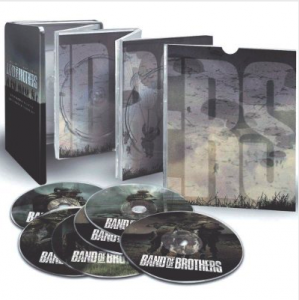
Band of Brothers Band of BrothersWhy buy them? I bought a couple of movies in the last couple of weeks. Including the 'Band of Brothers' DVD-box (probably the best TV-miniseries ever). Just to be reminded (again) that the original product (in general) is annoying as hell.

I started the DVD, and the first thing that I saw were some crappy trailers of crappy movies. The menu appeared only after I had FFWD'ed every single one of them.
After watching the first episode I wanted to quickly skip to the second.... No way of doing that besides stopping and starting the DVD from scratch. Which results in trailers etc. of the same (crappy) movies I have no interest in..... Every f*cking button, which might guide me to the menu, on my remote was unresponsive.

First thing on my list when I wake up tomorrow; rip the DVD's, remove every piece of DRM crap and enjoy the remaining episodes my way.
Honest people are hijacked by the MPAA (and associates) by forcing all this DRM crap upon those who buy legitimate DVD's. No wonder people are ripping and copying DRM protected content.

Every now-and-then you try to do the good thing, only to be reminded why you were ripping DVD's in the first place......

Posted on October 9, 2008 and filed under Annoying, DRM, Movies, Personal.

Copying EXIF Information

Lots of data is recorded in photos every time you take a picture with a modern digital camera (EXIF data). Stuff like; make, model, aperture, shutter speed, ISO etc. Nowadays, it's possible to add GPS information as well. This information is available in programs like Adobe Lightroom and Apple Aperture.

Unfortunately, the recorded information might get lost if you use graphics software to manipulate the photos. For example, I take 5 photos and blend them into one for a panoramic photo or an HDR photo. The result can be stunning, but mostly, the original EXIF information is gone. In these situations I copy the information using jhead (exiftool is an alternative) from one of the original images and place this in the final (manipulated) image. Downside is that this is kinda disrupting for my 'workflow', because is done by the command line.

It would be nice if e.g. Lightroom had a context menu of copying the EXIF information (this is possible for other metadata in the photos), and pasting it in the new photo.
Some might say that this might not be very ethical because the data is from another image, but then again, there are tools already available for doing this. Even though these aren't very user friendly. Perhaps a small suggestion for the developers.....

Posted on September 16, 2008 and filed under Annoying, Photography.

Apple Released OSX 10.5.5 Update

Apple released the 10.5.5 update last night.
What's included?

General

  • Includes recent Apple security updates.
  • Addresses stability issues with video playback, processor core idling, and remote disc sharing for MacBook Air.
  • Addresses an issue in which some Macs could unexpectedly power on at the same time each day.
  • Resolves a stability issue in TextEdit that could be found when accessing the color palette.
  • Improves Spotlight indexing performance.
  • Fixes an issue in which contacts might not sync properly with PalmOS-based devices.
  • Improves iPhone sync reliability with iCal and Address Book.
  • Includes improvements to Active Directory (see this article for more information).
  • Improves Speech Dictionary.
  • Fixes Kerberos authentication issues for Mac OS X 10.5 clients that connect to certain Samba servers, such as Mac OS X Server version 10.4.
  • Includes extensive graphics enhancements.

Mail

  • Addresses performance issues related to displaying IMAP messages.
  • Resolves an issue with SMTP settings for AIM, Compuserve, Hanmail, Yahoo!, and Time Warner Road Runner email accounts.
  • Addresses stability issues that may occur when dragging a file to the Mail icon in the Dock.
  • Addresses an issue with the "Organized by Thread" view in which the date does not appear when the thread is collapsed.
  • Resolves an issue in which RSS feeds could temporarily disappear from the sidebar.
  • Improves Mail robustness when sending messages.
  • Improves reliability when saving drafts that have attachments.

Time Machine

  • Improves Time Machine reliability with Time Capsule.
  • Addresses performance issues that may affect initial and in-progress backups.
  • Fixes an issue in which an incorrect alert message could appear stating that a backup volume does not have enough free space.
  • Time Machine can now back up iPhone backups that are on your Mac, as well as other items in (~/Library/Application Support).

And much, much more.

Posted on September 16, 2008 and filed under Apple, Operating Systems, Security, Software.

iTunes 8. Now With a Piece of 'Genius'

Some of you might have noticed that Apple introduced a new and improved iPod Nano, and some other iPod hardware. Apart from the hardware, they also released iTunes 8.

No subscription model for the music, but (apart from some other improvements) they added a Genius function. The Genius analyzes your music library, and makes suggestions on the music your playing. Cool feature since it finds/suggests songs with the same mood, but there's room for improvement.

Genius Playlist?? Genius Playlist??The following screenshot shows a overview of the 'Forty Licks' album of the Rolling Stones. As you might notice, the Genius in iTunes recommend that I seem to miss. I can buy these songs on the right. Notice the missing songs and the ones I marked in yellow.... Okay, one of them is spelled wrong (Jumping instead of Jumpin'), but the others are correctly spelled.

Even a Genius Makes a Mistake Even a Genius Makes a MistakeThis doesn't only occur on the album of the Stones. It occurs on almost every album/song I play.

Is Apple trying to earn an extra buck? Or is there a vacancy for a real Genius? Anyway, I'd love to have this feature on my iPod.

Posted on September 11, 2008 and filed under Apple, Music, Software.